ANDROID · PHOTO CLEANUP

One photo.
Your choice.

Swipe left to mark for deletion and right to keep. Compare similar shots and exact filename matches before deciding what stays.

Android only · v0.2.0 · 한국어 / English / 日本語

ONE PHOTO AT A TIME01 / PicKip
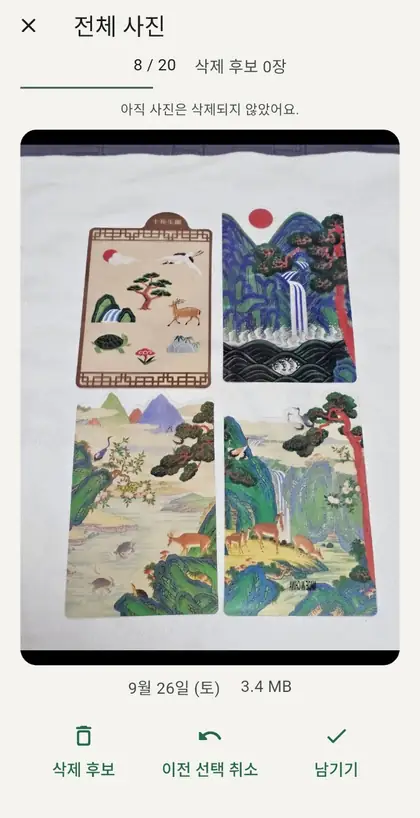
Actual PicKip swipe review screen in Korean, with mark-to-delete, undo and keep controls below the photo.
Mark to deleteKeep
Actual app · Korean screen · Click to enlarge
20, 50 or 100 at a time No photo uploads Review before deleting

A little at a time.
Not all at once.

A large library does not need a large commitment. Choose a small batch and make one decision at a time. Twenty is a session size, not a daily limit.

  1. 01

    Choose your batch

    Review 20, 50 or 100 photos. Start with all photos, screenshots, this month’s photos or photos more than a year old.

    2050100
  2. 02

    Swipe, then decide

    Left marks a photo for deletion; right keeps it. Undo your previous choice when needed. Swiping alone never deletes a photo.

  3. 03

    Take one last look

    See your candidates together. Keep anything you change your mind about, then choose trash or permanent deletion.

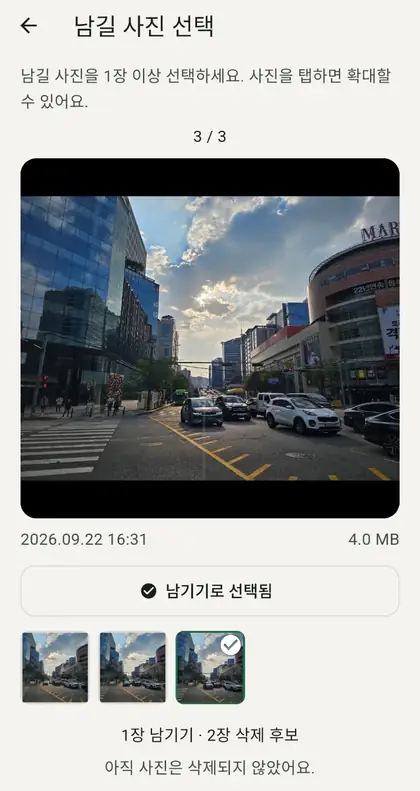
Part of the actual PicKip comparison screen in Korean, where the user chooses photos to keep.
Grouped comparison detail · Actual Korean capture

Similar photos.
Same filenames.

The two criteria stay separate, so you always know why a group was found.

A

Similar photos

Photos taken close together are compared by visual features. Use a recent preset or choose start and end dates, then keep selected photos or mark the whole group for final review.

Past monthPast 3 monthsAll datesCustom dates

This is not an exhaustive byte-level duplicate search. Results are candidates for your review, not automatic deletion decisions.

B

Same-name photos

Find exact filename matches across dates and folders. Compare the folder, dimensions, capture time and file size before choosing what to keep.

The same filename does not mean the photo content or file bytes are identical.

A choice,
not a deletion.

Candidate selection and actual photo removal are separate steps.

Your photos stay local.
Your choices stay yours.

No signup or photo uploads. Similarity analysis, filename checks, keep choices and cleanup records are processed and stored on your device.

The app may use Google AdMob ads. Advertising-related data may be processed separately from photo handling. See the in-app privacy information for details.

Good to know.

Other questions? Write to
aaggf1112@gmail.com.

Does swiping left delete a photo immediately?

No. It only marks the photo as a deletion candidate. Nothing is removed until you confirm it on the final review screen.

What is the difference between Similar photos and Same-name photos?

Similar photos compares the visual patterns of photos taken close together. Same-name photos groups exact filename matches across dates and folders.

Does the same filename mean the files are identical?

No. Two different photos can share a filename. Review the thumbnails, folders, dimensions, capture times and file sizes before choosing what to keep.

Can I mark an entire similar-photo group?

Yes. You can send the whole group to deletion candidates, undo that choice, and review everything again before any deletion.

Why does PicKip need photo access?

It reads photo lists, capture times, filenames and thumbnails to show and compare photos. With selected-photo access, only the photos you allow are available.

Is PicKip available on iPhone?

PicKip is currently Android-only and supports Korean, English and Japanese.

A lighter photo library.

Review one photo at a time and make the final call yourself.

Get it on Google Play

Available now on Google Play · Android only · v0.2.0

One-by-one photo review

These are actual supplied app captures. Screens may vary by app version.